
EPF Photo Upload has become a trending search term this week after multiple financial news outlets reported that an updated profile photo is now essential for completing the e-nomination process on the EPFO member portal. Lakhs of Provident Fund subscribers across India are searching for clear instructions on how to complete this process, what photo specifications are required, and why it suddenly matters so much for their PF account. This complete guide walks you through everything you need to know about updating your photo, avoiding common upload errors, and understanding why this small step can prevent big delays in your claims and nominations.
Why This Update Matters Right Now
This requirement has recently gained attention because an updated profile photo is required to successfully submit an e-nomination on the EPFO member portal. Without a properly uploaded photo, the e-nomination process cannot be completed, which means your nominee details may remain incomplete in the system. This can create unnecessary complications later, especially during PF claim settlements or when family members need to access benefits linked to your account.
News outlets including major financial publications have been covering this topic extensively over the past few days, highlighting how millions of subscribers may be affected if they have not already updated their profile. The sudden surge in coverage has led to a noticeable spike in searches, with many members logging into the portal for the first time in years to check their account status.
What Is EPF Photo Upload
EPF Photo Upload refers to the process of adding or updating a passport-size photograph on your Employees’ Provident Fund member profile through the official EPFO Unified Member Portal. This photograph serves as a visual identity marker linked to your Universal Account Number, helping EPFO verify member identity during claims, nominations, and other important account services.
The requirement has existed for some time, but it has become more prominent recently because the e-nomination process, which allows members to designate their nominees for PF benefits, specifically requires a valid uploaded photograph before it can be submitted successfully. Many members who attempted to complete their nomination recently discovered that the system would not let them proceed without first completing this step.
For members who have not touched their profile in years, completing this update now can save considerable time and frustration later, particularly during emergencies when quick access to PF funds becomes critical for the family.
Step-by-Step Guide to EPF Photo Upload
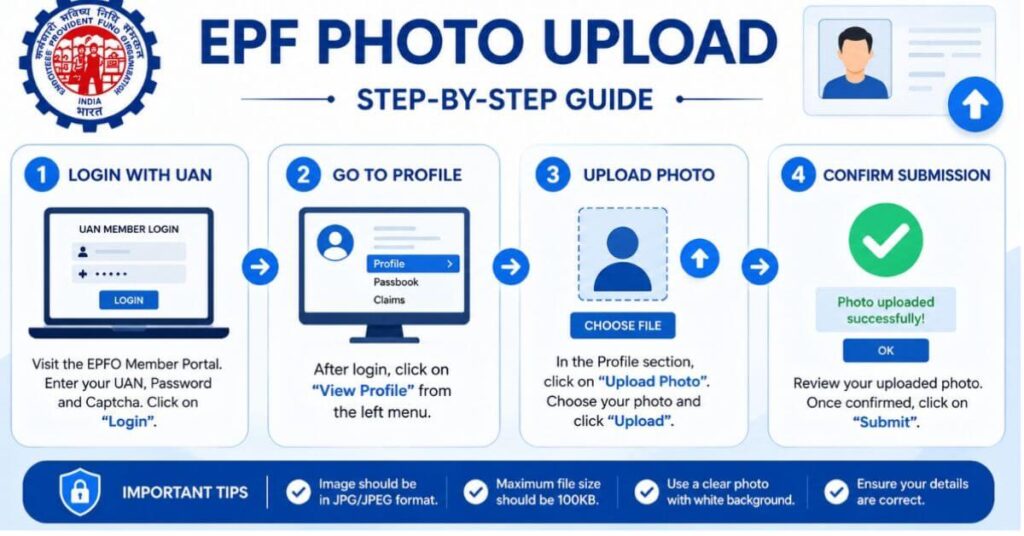
Completing EPF Photo Upload is straightforward and can be done entirely online through the official EPFO member portal. Here is how members can complete the process from start to finish.
First, visit the EPFO Unified Member Portal and log in using your twelve-digit Universal Account Number, your password, and the captcha code displayed on the screen. Once logged in, navigate to the View menu located on the top navigation bar and select the Profile option from the dropdown list. This will take you to your member profile page, where you can view your existing details and photo status.
Next, look for the option to upload or update your photograph within the profile section. Click on the browse or upload button, select the photo file from your device, and preview the image before confirming the submission. It is important to review the preview carefully, since some members have reported errors when the system prompts a confirmation message asking whether they are sure about uploading the previewed photograph.
After confirming, the system will process your submission, and your updated photo should reflect on your profile shortly afterward. Completing EPF Photo Upload correctly at this stage will allow you to proceed with the e-nomination process without further interruptions.
Photo Specifications and Requirements
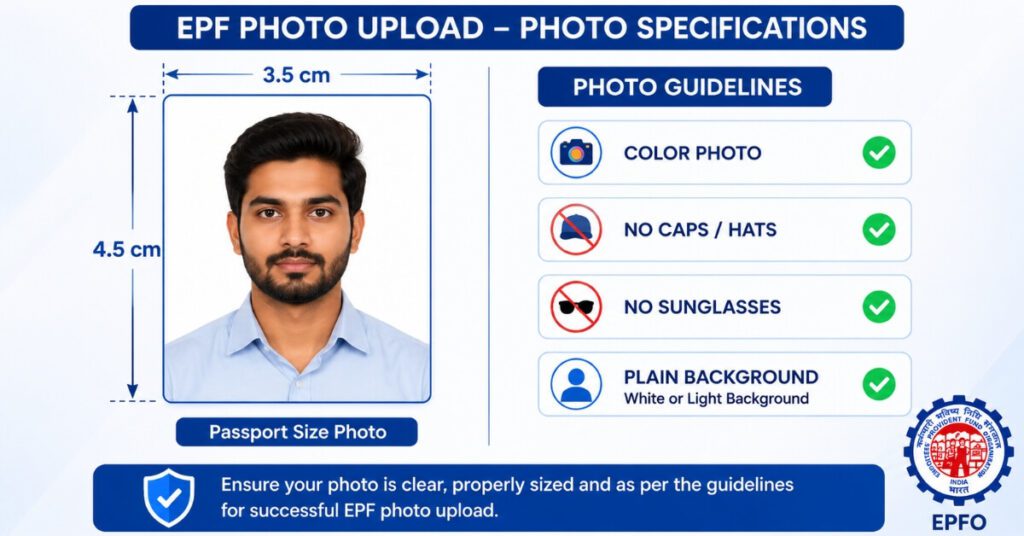
EPFO has specific guidelines regarding the photograph used for EPF Photo Upload. According to official guidelines, the photograph should be recent, recognizable, and in color. Black and white or heavily filtered images are typically not accepted by the system. The photograph should also be of passport size, generally measuring around 3.5 centimeters by 4.5 centimeters, with the member’s face clearly visible and taking up a significant portion of the frame.
Caps, hats, and dark glasses are not acceptable in the photograph, as these can obscure facial features needed for identity verification purposes. Additionally, the file size typically needs to be under a certain threshold, often around 100 kilobytes or less depending on the specific portal requirements at the time of upload, so members may need to compress their image before attempting to submit it. Using a plain, light-colored background also helps avoid rejection during the automated verification stage.
Common Errors During EPF Photo Upload
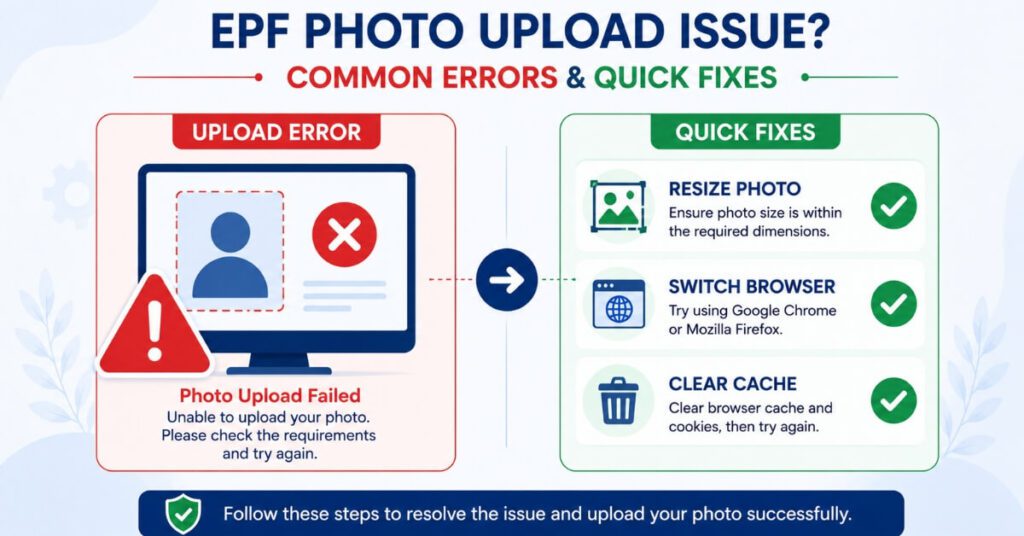
Many members encounter technical issues while attempting EPF Photo Upload, and online forums are filled with subscribers describing similar frustrations. One of the most commonly reported problems is that the photo selection and submission process does not complete successfully, even after selecting a valid file that meets the size and dimension requirements. This has led to significant frustration among members trying to complete their e-nomination before facing further delays.
Browser compatibility issues have also been cited as a possible cause, with some members reporting success after switching to a different browser or clearing their cache before attempting the upload again. If the standard process fails repeatedly, contacting the EPFO helpdesk directly can sometimes help resolve server-side issues that are outside the member’s control. Some users have also found that using a mobile browser instead of a desktop browser, or vice versa, resolves the issue when one platform consistently fails.

How EPF Photo Upload Connects to E-Nomination
The e-nomination facility allows EPF members to designate who should receive their Provident Fund balance, along with any associated insurance benefits, in the event of the member’s death. Completing EPF Photo Upload is a prerequisite step for this process, since the EPFO system requires a valid photograph on file before allowing the nomination form to be submitted.
Without completing the e-nomination process, family members may face significant delays and additional paperwork requirements when trying to claim benefits after a member’s passing. This makes the photo requirement not just a formality, but a genuinely important step in ensuring your family’s financial security is protected without unnecessary bureaucratic hurdles.
Is EPF Photo Upload Mandatory for Everyone
While EPF Photo Upload is not strictly mandatory for every single transaction on the EPFO portal, it is required for specific and important services, most notably the e-nomination process. Members who only wish to check their passbook or view basic account details may not immediately need to complete this step. However, given how closely it is tied to nomination and claims processing, financial experts and EPFO communications increasingly recommend that all members complete their photo update regardless of whether it is technically required for their immediate purpose.
Given the relatively low effort involved compared to the potential complications of an incomplete profile, most financial advisors suggest treating this task as essential rather than optional, especially for members who have dependents relying on their PF savings.
Resizing Your Photo for EPF Photo Upload
Since the EPFO portal has strict size and dimension requirements, many members struggle to get their photograph into the correct format on the first attempt. Several free online tools have emerged specifically to help with EPF Photo Upload by resizing images to the exact 3.5 by 4.5 centimeter specification while also compressing the file size to meet portal limits, typically without noticeably reducing image quality.
Using a dedicated photo resizing tool before attempting your upload can save considerable time and reduce the frustration of repeated failed attempts. Simply take a clear, well-lit photograph against a plain background, run it through a compatible resizing tool, and then proceed with the standard steps on the member portal. Many of these tools are free, browser-based, and do not require any software installation, making them accessible even for members who are not particularly tech-savvy.
What Happens If You Skip This Step
Members who choose to skip EPF Photo Upload may not face immediate consequences, but they could encounter significant friction later when trying to complete time-sensitive tasks like e-nomination or claim submissions. Since an incomplete profile often triggers additional verification steps, skipping this process now essentially defers the inconvenience to a later date, often at a time when speed matters most, such as during a family emergency requiring urgent access to PF funds.
Financial planners generally advise completing routine account maintenance tasks like this one well in advance, rather than waiting until a claim or nomination becomes urgent, since portal traffic and processing delays tend to increase during periods when many members are simultaneously trying to resolve similar issues, as has been observed with the recent surge in interest around this topic.
Employer Responsibilities and Support
While the responsibility for completing EPF Photo Upload ultimately rests with the individual member, employers often play a supporting role by informing employees about pending profile updates during routine HR communications. Some organizations have started including reminders about completing this update as part of their onboarding and annual compliance checklists, recognizing that an incomplete PF profile can create administrative headaches for both the employee and the HR department when claims or transfers need to be processed.
If your employer’s HR team has access to bulk member data, they may also be able to flag which employees have not yet completed their profile photo requirement, allowing for targeted reminders rather than blanket communications that employees might overlook.
Security Considerations During the Process
When completing this process, it is important to only use the official EPFO Unified Member Portal and avoid third-party websites claiming to offer shortcuts or faster processing. Since this process involves uploading personal identification material linked to your financial savings, using unofficial platforms could expose your data to unnecessary risk. Always verify that you are on the correct government domain before entering your Universal Account Number, password, or uploading any personal documents.
Broader Financial Planning Considerations
While updating your profile photo is an important account maintenance task, it fits into a broader pattern of keeping your financial documentation current and accessible. Just as EPF members benefit from maintaining updated nominee and photo details, investors in other government-backed savings instruments should also review their account details periodically. For instance, if you also hold a Post Office Time Deposit Scheme account, reviewing your nomination details there is equally important for ensuring smooth fund transfer in case of unforeseen circumstances, and keeping all your financial accounts synchronized in terms of documentation reduces stress for your family during difficult times.
For the most accurate and updated information regarding this requirement, members should always refer to the official EPFO website, which publishes current guidelines, portal updates, and troubleshooting resources directly from the department.
Mobile App Access and Alternatives
Beyond the standard web portal, some members have found it more convenient to complete this process using the UMANG mobile application, which also provides access to several EPFO services including profile updates in certain cases. While the core steps remain largely similar, the mobile interface can sometimes offer a smoother experience for members who face repeated failures on the desktop browser version. It is worth noting that not all features are always available on every platform simultaneously, so if one method fails, trying the alternative platform is a reasonable next step before contacting the helpdesk.
Members should also keep in mind that regardless of which platform is used, the underlying photo specifications and quality requirements remain the same. Switching platforms will not bypass these requirements, but it may resolve technical glitches that are specific to a particular browser or app version.
What EPFO Communications Have Said
Recent statements circulated through EPFO channels and picked up by major financial news outlets have reinforced that while this update is not compulsory for basic passbook viewing, it is strongly recommended for all active subscribers, particularly those who have not reviewed their nominee details in several years. This guidance aligns with the broader push toward digitizing and modernizing PF account management, ensuring that claims and settlements can be processed faster with fewer manual interventions required from EPFO staff.
Given the volume of subscribers EPFO manages, even small improvements in profile completeness across the member base can meaningfully reduce processing backlogs during peak claim periods, which benefits both the organization and individual members waiting on their funds.
Tips for a Successful EPF Photo Upload
To avoid the common errors reported by other members, take your photograph in good lighting against a plain, light-colored background. Avoid wearing caps, hats, or sunglasses, and ensure your face is clearly visible and centered in the frame. Before attempting the upload, resize the image to match the required dimensions and compress it if necessary to stay within the file size limit.
If the upload fails on your first attempt, try clearing your browser cache, switching to a different browser, or attempting the process on a different device. Many members have found success simply by trying again after a short wait, since server load on the EPFO portal can fluctuate significantly during peak usage periods, particularly when many members are attempting this update simultaneously due to recent news coverage.
Frequently Asked Questions About EPF Photo Upload
Q1.Is EPF Photo Upload mandatory for all EPFO members?
This step is not mandatory for every single transaction, but it is required to successfully complete the e-nomination process on the EPFO portal.
Q2.What is the correct photo size for EPF Photo Upload?
The photograph should generally be passport size, around 3.5 by 4.5 centimeters, in color, recent, and clearly recognizable, without caps, hats, or dark glasses.
Q3.Why does my EPF Photo Upload keep failing?
Common reasons include incorrect file size, browser compatibility issues, or temporary server problems on the EPFO portal. Trying a different browser or resizing your photo often resolves the issue.
Q4.How does EPF Photo Upload relate to e-nomination?
Completing this step is a prerequisite, since the EPFO system requires a valid photograph on file before the e-nomination form can be submitted successfully.
Q5.Where can I complete EPF Photo Upload?
You can complete this process by logging into the EPFO Unified Member Portal using your Universal Account Number and navigating to the Profile section under the View menu.
Conclusion
EPF Photo Upload may seem like a minor administrative task, but it plays a genuinely important role in ensuring your Provident Fund account remains fully functional for e-nomination, claims, and other essential services. With recent news coverage highlighting how an incomplete profile photo can delay important processes, now is a good time for every EPFO member to log into the portal and confirm their photo status.
By following the correct specifications, using a resizing tool if needed, and troubleshooting common upload errors, you can complete this update smoothly and ensure your account is fully prepared for whatever financial planning needs arise in the future.
Disclaimer
This article on EPF Photo Upload is for informational purposes only and should not be considered official EPFO guidance or financial advice. Portal requirements and procedures are subject to change by the Employees’ Provident Fund Organisation from time to time. Please refer to the official EPFO website or contact the EPFO helpdesk directly to confirm the latest requirements before completing your photo upload.

Pingback: Mutual Fund Nominee Rules 2026: 5 Powerful Changes